

23rd April 2026

Why Most Portfolios Fail (And How Yours Won’t)
You have the skills. Maybe you are a graphic designer, a writer, a photographer, or a freelance marketer. You are ready to find clients. So you do what everyone tells you: You upload your work to Instagram and share a Google Drive link with your resume.
Then silence.
Here is the hard truth:
Social media and PDFs do not build trust. They look temporary. They look like you are not serious.
I have seen talented beginners lose great projects simply because their “portfolio” was a messy link or an old Behance page. Clients want to see three things: your work, your professionalism, and your reliability. If you don’t have a website, you look like a hobbyist.
But here is the good news: In 2026, building a portfolio website for beginners is easier than learning how to edit a video on your phone. You do not need to write code. You do not need a big budget. You just need a simple roadmap.
Let me show you exactly how to build a professional portfolio website that turns visitors into paying clients.
What Is a Portfolio Website and Why Does It Matter?
A portfolio website is your home on the internet. It is a simple website that shows:
- Who you are
- What you have made (your best work)
- How someone can hire you
Think of it like a digital storefront. If you owned a bakery, you would not just hand people raw flour and sugar. You would display the cakes in a clean, well-lit window. Your portfolio is that window.
Why you need one in 2026:
- Control: Instagram or LinkedIn can change their rules or shut down your account. Your website is yours forever.
- Credibility: 75% of clients admit they judge a freelancer’s professionalism by their website.
- Filtering bad clients: A clear portfolio scares off people who want cheap work. It attracts serious buyers.
If you are searching for a personal branding website that actually works, stop looking for shortcuts. A simple, clean portfolio beats a fancy, confusing one every time.
Key Elements of a Professional Portfolio
Before we build, let us agree on what makes a portfolio look professional.
The 5 non-negotiable ingredients:
- Your best 3–6 projects (not 30). Nobody has time to scroll through everything. Show your absolute best work only.
- Clear contact information. An email address and a contact form. Do not hide it.
- A short bio. Who are you? What problem do you solve? Write it like you talk.
- Social proof (testimonials). Even one quote from a past client or professor helps.
- Fast loading speed. If your site takes longer than 3 seconds to load, people leave.
Beginner mistake to avoid: Using a free template but never changing the fake text and photos. A portfolio with “Lorem ipsum” text or stock photos of happy strangers screams “fake.” Use your real name, your real face, and your real work.
Step-by-Step Guide: How to Build a Portfolio Website in 2026
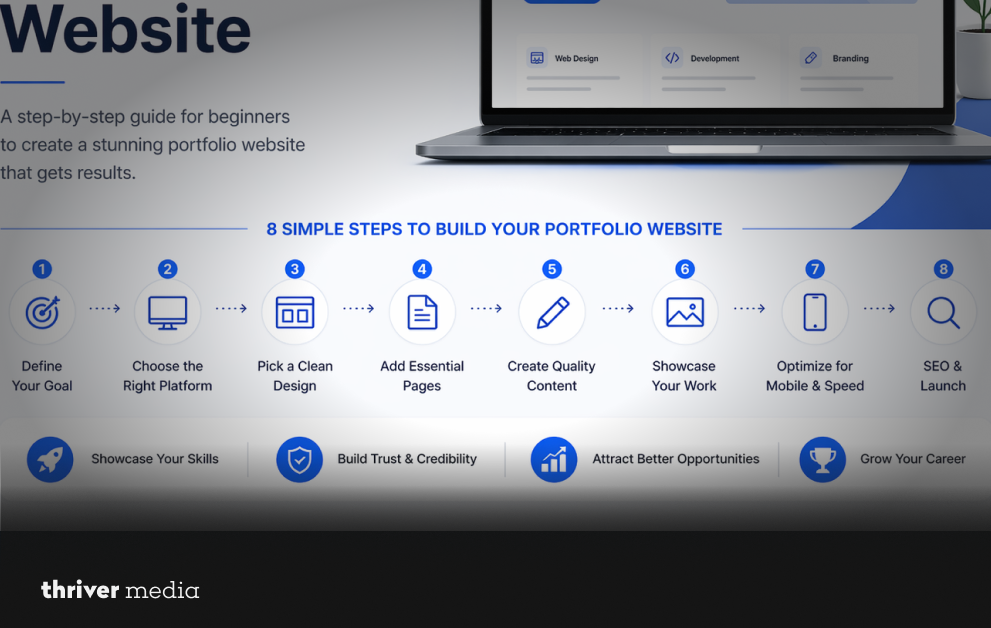
Let us walk through the process. Take a deep breath. This is easier than ordering coffee from a complicated app.
Step 1: Choose Your Niche and Goal
Before you touch a computer, answer two questions:
- What specific service do you offer? (“I design logos for vegan bakeries” is better than “I design stuff.”)
- What do you want the visitor to do? (Call you? Fill a form? Buy a service package?)
- Write this down. Your entire website will serve this one goal.
Step 2: Select the Right Platform
This is where most beginners freeze. Do not overthink it. Here is a simple beginner website guide to platforms.
| Platform | Ease of Use | Best For | Cost (Monthly) | Flexibility |
| WordPress (.org) | Medium (requires setup) | Bloggers, serious freelancers, SEO lovers | $5–$15 (hosting) | Very High |
| Wix | Very Easy | Absolute beginners, artists, quick setup | $10–$20 | Medium |
| Webflow | Hard (learning curve) | Designers who want total visual control | $15–$30 | Very High |
| Squarespace | Easy | Creatives, photographers, sleek templates | $15–$25 | Medium |
My recommendation for 2026 beginners: Start with Wix or Squarespace. You can build a professional portfolio website in one afternoon without watching hours of tutorials. Save WordPress for later when you need advanced features.
Step 3: Pick a Clean Design and Layout
Here is a secret: Clients do not love “creative” chaos. They love clarity.
Rules for a safe, professional layout:
Use white space (empty areas around text and images). It makes you look calm and organized.
Pick one font for headings and one for body text. (Google Fonts has free pairs like “Poppins” for headings and “Open Sans” for text.)
Use a simple color palette: White background, dark grey text, and one accent color (like blue or green) for buttons.
Do not use rainbow colors, animated text, or background music. This is not 1998.
Step 4: Add Essential Pages (No More, No Less)
Your portfolio website needs five pages. That is it.
- Home: A headline that says what you do. Example: “I turn rough ideas into polished brand logos.”
- About: Your story + your face (a real photo, not a selfie in a dark room).
- Portfolio / Work: 3-6 case studies. For each project, explain: The problem → What you did → The result.
- Services: List your offers and prices (or “starting at” ranges). This filters out time wasters.
- Contact: A simple form (Name, Email, Message) and your email address.
Step 5: Write Clear and Simple Content
You are not writing a novel. You are helping a busy client understand you in 10 seconds.
The formula for every page:
- Short sentences (max 20 words).
- Speak directly to the reader (“You need a logo that stands out” not “One might require branding”).
- Use bullet points for lists (like this one).
- Example of good “About Me” text for a beginner:
“Hi, I’m Jamie. I help small bakeries and coffee shops design logos that look good on bags, cups, and Instagram. I have worked with three local shops, and every single one saw more foot traffic after their rebrand. Let me show you what I can do.”
See how natural that sounds? Be human.
Step 6: Optimize for Mobile and Speed
Here is a shocking fact: Over 60% of people will view your portfolio on a phone. If your site looks broken on mobile, they assume you are broken too.
Quick fixes:
- Use a “mobile responsive” template (all modern platforms have this).
- Compress your images. Use free tools like TinyPNG to make file sizes smaller.
- Do not autoplay videos. They kill speed.
Step 7: Add SEO Basics (So People Can Find You)
SEO sounds scary, but for a beginner, it is just three simple habits:
- Put your main keyword in your page title (e.g., “Logo Designer for Bakeries | Jamie Smith”).
- Write a short description for each page (150 characters max).
- Name your image files something useful like “bakery-logo-design.jpg” instead of “IMG_4938.jpg.”
That is 80% of the work. Do not get lost in advanced SEO yet.
Common Mistakes Beginners Make (And How to Avoid Them)
I have reviewed hundreds of beginner portfolios. Here are the top three killers:
Mistake #1: Hiding your contact info.
Fix: Put a “Hire Me” button at the top right of every page.
Mistake #2: Showing only final results (no process).
Fix: Add 2–3 sketches or rough drafts to show how you think. Clients pay for your brain, not just the pretty picture.
Mistake #3: No call to action.
Fix: Every page should end with a sentence like “See my work” or “Get a free quote.”
How Thriver Helps Beginners Build Portfolios That Actually Work
Look, you can build a portfolio by yourself. I just gave you the roadmap. But knowing the steps and executing them well are two different things.
Many beginners get stuck on the messy details: choosing the right words, arranging the layout so it flows, or setting up the technical backend so it loads fast. That is where Thriver comes in.
We help freelancers, consultants, and small business owners build professional portfolio websites that are not just pretty, but profitable. We focus on:
- Clear messaging that speaks directly to your ideal client.
- Conversion-focused design that turns “just looking” into “let’s work together.”
- Growth systems so your portfolio can scale as you take on bigger projects.
If you want to skip the headaches and launch a portfolio that makes you look like you have been in business for five years, Thriver builds the foundation. You bring the talent.
FAQs
How much does a beginner portfolio website cost?
You can start for $10–$20 per month using Wix, Squarespace, or affordable WordPress hosting.
Do I need to know coding to build a portfolio?
No. Drag-and-drop builders like Wix and Squarespace require zero coding knowledge.
How many projects should I show as a beginner?
*Show 3 to 6 high-quality projects. Even school projects or volunteer work count if they look good.*
Can I use a free portfolio platform like Behance instead of a website?
Yes, but a custom website looks more professional and gives you control over your branding.
How long does it take to build a portfolio website?
*Using a template, you can have a live, professional-looking site in 2 to 4 hours.*
The Bottom Line
Your skills are valuable. But skills alone do not pay the bills. Visibility and trust pay the bills. A portfolio website for beginners is the single highest-ROI project you can build in 2026. It works for you 24 hours a day. It pre-sells your expertise before you even talk to a client.
Do not wait until your portfolio is “perfect.” Perfect does not exist. Launch a simple, clean, honest website this week. Then improve it as you go.
Conclusion
You now have the exact steps to build a professional portfolio website from scratch. You know which platform to pick, what pages to add, and how to write content that sounds like a real human being.
Stop sending messy Google Drive links. Stop hoping Instagram will send clients your way. Take control of your career today.
Open a new tab. Go to Wix or Squarespace. Start your free trial. In three hours, you will have a website that makes you look like the expert you already are.
Your next client is out there. Give them a place to find you.
Contact Thriver today and let’s start building rankings that last.
Want more? Subscribe to Thriver Media and never miss a beat.